How to Reduce Your AI Support Escalation Rate (Without Sacrificing CSAT)
Chris CholetteFounder, CloneDeskMay 20269 min read
Your AI support tool is escalating nearly half your tickets to a human agent. That's not a configuration problem — that's the industry average. The benchmark for AI-first support in 2026 is a 47–63% escalation rate. If you're in that range, your AI isn't saving headcount; it's adding a routing layer on top of the same human workload.
This article explains why standard AI tools produce high escalation rates, how to audit your actual numbers, and what behavioral fine-tuning does differently — including the concrete tactics you can apply this quarter regardless of which platform you're on.
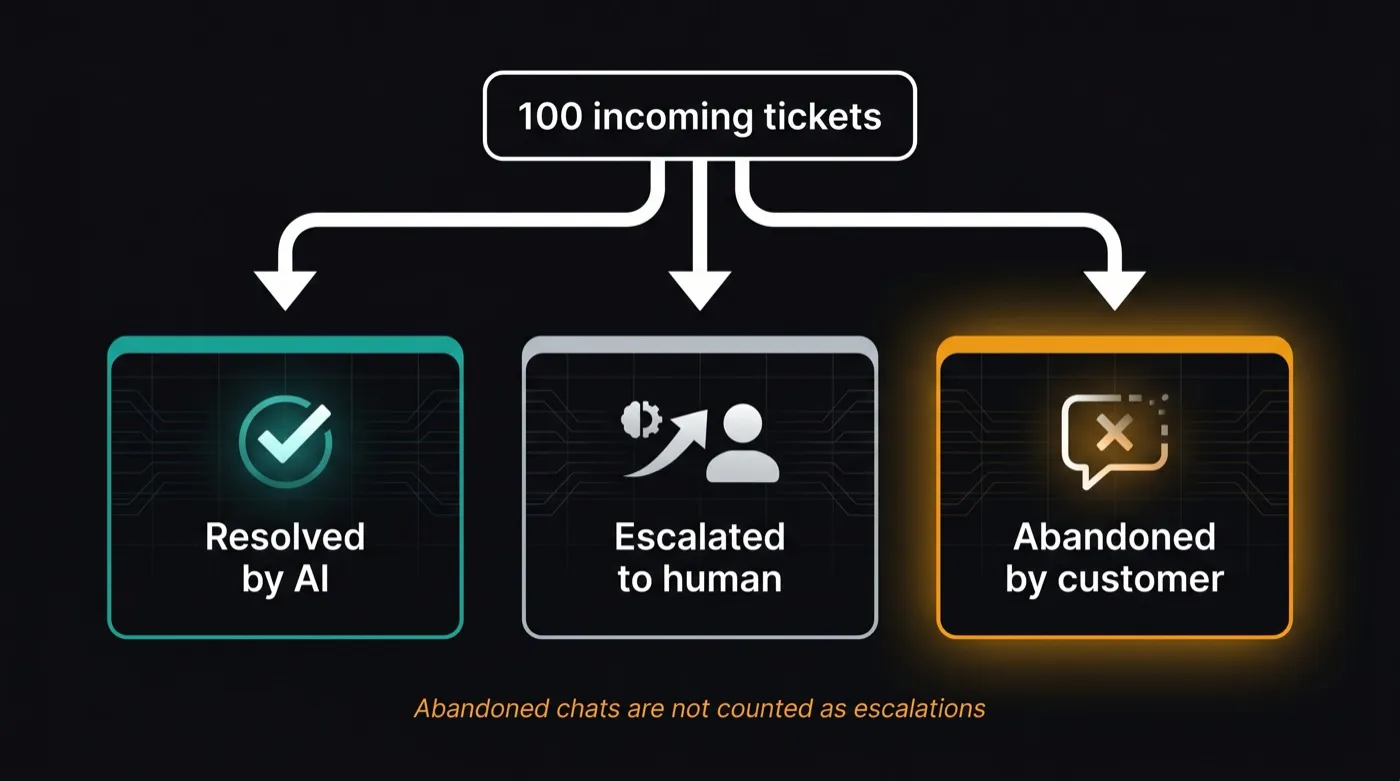
Abandoned chats never get counted as escalations — so your dashboard's escalation rate can look healthy while customers quietly give up.
What's a Good AI Support Escalation Rate?
The escalation rate measures what percentage of tickets initially handled by AI end up being transferred to a human agent. It's the most honest measure of whether your AI is actually resolving tickets or just creating an extra step before the human does the work anyway.
Scenario
Escalation Rate
Assessment
Industry average (AI-first support, 2026)
47–63%
Most AI tools are here
Standard RAG-based AI (optimized)
30–45%
Best case for out-of-box tools
Human-assisted AI (AI drafts, human approves)
15–25%
Requires agent time for review
Behavioral fine-tuning (workflow cloning)
15–25%
Fully automated, no agent review
Target for most support teams
< 20%
Where ROI on AI becomes real
Sources: Industry AI support benchmarks 2025–2026. Behavioral fine-tuning rates based on teams with 5,000+ clean historical interactions.
The uncomfortable truth: most teams buying AI support tools are spending money to route tickets to the same humans who were handling them before. Until your escalation rate drops below 25%, the AI is a cost center, not a savings center.
Why Your AI Support Tool Keeps Escalating Tickets
High escalation rates aren't a tuning problem you can fix by tweaking a system prompt. They're an architectural problem. Standard AI support tools — Zendesk AI, Intercom Fin, most chatbot platforms — are built on RAG (retrieval-augmented generation). They retrieve relevant documents from your knowledge base at query time and pass them to a language model to generate a response.
RAG escalates excessively because it fails in four specific ways:
Multi-turn context collapse. Each message retrieves fresh documents. The AI doesn't remember what it said two turns ago, what the customer already tried, or what context was established earlier in the conversation. When context is lost, the AI defaults to escalation.
Policy nuances aren't in documents. Your knowledge base describes your standard policies. It doesn't describe the judgment calls — when to make an exception, how to handle a repeat customer with a billing dispute, what to do when a customer is threatening to cancel. Those decisions live in your agents' heads, not in docs.
Billing and account disputes require privileged access. Any ticket that requires looking up account-specific data — charge amounts, subscription history, prior interactions — is outside what a document retrieval system can handle. The AI knows what your refund policy says; it doesn't know that this specific customer was overcharged last month. So it escalates.
Confidence miscalibration. RAG systems calibrate confidence against their ability to find a relevant document. "No relevant document found" and "this ticket needs a human" look identical to the model — so both get escalated. Behavioral models calibrate differently: they've seen what your team actually escalated vs. resolved, so they distinguish between "unfamiliar ticket type" and "genuinely needs human judgment."
"The AI can't tell the difference between 'I don't have documentation for this' and 'this genuinely needs a human.' So it escalates both. Your escalation rate is the sum of both categories."
The Abandonment Trap: Why Your Escalation Rate Looks Better Than It Is
Here's the number your vendor dashboard isn't showing you: your abandonment rate.
When an AI can't resolve a ticket, two things can happen. The customer escalates — they ask for a human, they reopen the ticket, they call in. Or the customer abandons — they give up, go silent, don't pursue it further through your support channel. In most vendor dashboards, abandonment looks like resolution. The conversation ended. The ticket closed. No human was needed. Resolution: logged.
The escalation-vs-abandonment trap
Vendors count a conversation as "resolved" when it ends without human involvement — even if the customer received an inaccurate answer, gave up in frustration, or submitted a new ticket through a different channel. Your true unresolved rate is escalation rate + abandonment rate. Vendors only show you the first half.
The downstream evidence is in your churn data and repeat contacts. A customer who abandons a billing dispute doesn't appear in your escalation metrics. They appear in your churn cohort six weeks later. The inflated "resolution" rate is a leading indicator of a CSAT and retention problem that surfaces with a lag.
This is why reducing escalation rate purely by raising the AI's confidence threshold — forcing it to handle more tickets — is counterproductive without improving actual resolution quality. You lower the reported escalation rate while increasing abandonment. The dashboard looks better; the business gets worse.
CloneDesk learns your escalation logic from historical decisions — not rules. Join the early access list to see projected escalation reduction on your data.
Before you can fix your escalation rate, you need to know what it actually is — segmented, not averaged. Here's what to pull and how to read it.
What to measure: Pull the last 90 days of tickets that were initially routed to or handled by AI. Count the ones that were: transferred to a human agent, reopened within 24 hours of AI closure, or flagged with a low CSAT score (1–2 stars) after AI handling. Sum those three buckets. That's your functional escalation rate — which will be meaningfully higher than your platform's reported rate.
Segment by ticket type first. An overall 40% escalation rate is almost always a weighted average of very different numbers. FAQ and order tracking might escalate at 12%. Billing disputes might escalate at 74%. If you're trying to improve a 40% overall rate without segmenting, you're optimizing the wrong tickets. Find your two or three highest-escalation categories — that's where the fix is.
Segment by channel and customer tier. Enterprise customers or high-value accounts may have escalation rates 2–3x higher than your average because their tickets are more complex. If those customers are on a premium tier, their escalations cost you disproportionately in agent time and retention risk.
Billing & account disputes
Highest escalation category — typically 60–80% of these tickets reach a human under standard RAG
60–80%
escalation rate
Multi-turn complex issues
Context collapse causes AI to restart or escalate — typically 50–70% escalation rate
50–70%
escalation rate
FAQ & order status
Standard RAG handles these well — escalation rate 10–25% in most deployments
10–25%
escalation rate
The segmented picture tells you where to invest. Optimizing your FAQ handling from 15% to 10% escalation doesn't move your overall numbers much. Cutting your billing escalation from 75% to 30% does.
How Workflow Cloning Reduces Escalation Rate
Workflow cloning is a different approach to teaching AI when to escalate. Instead of writing rules — "escalate if the word 'billing' appears," "escalate if customer mentions cancellation" — you let the model learn from the 5,000+ escalation decisions your team has already made.
What is workflow cloning?
Workflow cloning extracts resolution and escalation patterns from your best human agents' historical decisions and encodes them into AI model weights using LoRA behavioral fine-tuning. The model doesn't retrieve documents at inference time — it has learned your team's judgment: what gets resolved, what gets escalated, and how the edge cases between them are handled.
The difference in escalation behavior is structural. A RAG system escalates when it can't find a relevant document — which includes edge cases, policy nuances, and anything outside your knowledge base. A behaviorally fine-tuned model escalates when the pattern matches tickets that your team historically escalated — a much smaller and more accurate set.
Concretely: your team has resolved thousands of billing tickets that never needed escalation — account adjustments, refund confirmations, plan downgrades. And they've escalated a smaller set of billing tickets that genuinely required judgment: fraud suspicion, disputed charges over a certain threshold, accounts with payment plans in negotiation. A behavioral model learns the difference. A RAG system sees "billing" and hedges toward escalation because it doesn't have a document for every scenario.
The "confidence threshold" lever works differently in behavioral models too. RAG calibrates confidence against document relevance — a poor proxy for "should this be escalated." A behavioral model calibrates against patterns from your actual escalation history. When it's uncertain on a ticket type it has seen before, it knows whether your team typically resolved or escalated that type. When it encounters a genuinely novel pattern, it escalates — not just because no document was found.
Whether or not you switch platforms, here are five actionable moves that can reduce your escalation rate within 90 days. They work on any AI support tool; the gains are just larger if you pair them with behavioral fine-tuning.
01
Audit your knowledge base for escalation gaps
Pull the last 60 days of escalated tickets and tag the root cause: missing policy documentation, account-specific data required, emotional or frustrated customer, multi-turn context lost. Every "missing policy" tag is a fixable knowledge gap. Close those gaps first — it's the fastest win for RAG-based systems and reduces escalation on a significant slice of tickets within weeks.
02
Retrain on your highest-escalation ticket types
Most AI systems are trained or prompted on common ticket types where they already perform well. Your escalation problem is concentrated in the tail. Build a curated dataset of your 200–500 best-resolved examples in each high-escalation category — billing, account disputes, complex returns — and use them to fine-tune your model or update your prompt examples. The model needs to see what good looks like on the hard tickets, not just the easy ones.
03
Recalibrate your confidence threshold by ticket type
Don't use a single global confidence threshold. Run an analysis on the last 30 days of borderline escalations — tickets that escalated where the AI had relatively high confidence. For those ticket types, your threshold is set too conservatively. Raise it specifically for those categories. For ticket types where agents frequently correct AI responses, lower it. Segmented calibration reduces escalation without increasing bad resolutions.
04
Build separate handling flows for high-escalation ticket types
Instead of trying to improve a single AI model across all ticket types, route your two or three highest-escalation categories into dedicated flows with specialized context. Billing disputes get a flow with account lookup capability and a specific escalation policy prompt. Complex multi-step tickets get a flow with extended context windows and conversation summarization between turns. Separation lets you optimize each flow independently rather than averaging across all ticket types.
05
Replace auto-escalation with human-review for borderline cases
For tickets where AI confidence is borderline — not clearly resolvable, not clearly an escalation — route to a review queue rather than full escalation. An agent approves or lightly edits the AI's draft before it's sent. This keeps tickets out of the full escalation queue, reduces agent load versus handling the ticket from scratch, and generates high-quality labeled training data (approved draft = good resolution signal; edited draft = edge case signal) for the next training iteration.
The industry average AI-first support escalation rate is 47–63% in 2026. A good target is under 20%. Teams using behavioral fine-tuning on clean historical data typically reach 15–25% fully automated, compared to 30–45% best-case for optimized RAG tools.
Why does my AI support tool keep escalating tickets?
Standard RAG-based tools escalate excessively because they cannot maintain multi-turn context, distinguish policy nuances from document gaps, or calibrate escalation decisions against your team's actual judgment. The AI treats "no relevant document found" and "this needs a human" as the same signal — so both get escalated.
How do I calculate my real escalation rate?
Count tickets that were transferred to a human, reopened within 24 hours, or received a 1–2 star CSAT score after AI closure — divided by total AI-touched tickets. This functional escalation rate will be 10–20 points higher than your platform's reported rate, which typically excludes abandoned tickets.
What is workflow cloning?
Workflow cloning extracts resolution and escalation patterns from your best agents' historical decisions and encodes them into a fine-tuned AI model using LoRA. The model learns directly from 5,000+ real decisions your team made — including the judgment calls on edge cases — instead of applying generic rules about when to escalate.
How much can behavioral fine-tuning reduce escalation rate?
Teams with clean historical data typically see a 30–45% reduction in escalation rate compared to their RAG baseline. The improvement is largest on billing disputes and account tickets, where context requirements and policy nuance cause the most RAG failures.
Cut Your Escalation Rate Before Next Quarter's Review
CloneDesk trains behavioral agents from your historical escalation decisions — not your knowledge base. See your projected escalation reduction on your actual data before going live. $0.99 per resolution. Free tier: 100/month.