Behavioral fine-tuning is a way of training an AI support agent on your resolved interactions — not your documentation — so that the model learns how your best agents handle tickets, rather than just what your knowledge base says. The result is a model whose behavior is encoded into its weights, not retrieved at query time.
If you've been shopping AI support tools and heard "fine-tuning" used interchangeably with "RAG" — or as a vague marketing term — this article will give you a precise picture of what each approach actually does, where each one breaks down, and why the distinction matters when you're looking at production resolution rates.
The Standard Approach: How RAG-Based AI Support Works
Definition
RAG (retrieval-augmented generation) is the architecture behind most AI support tools today, including Zendesk AI and Intercom Fin. When a customer submits a ticket, the system searches your knowledge base for relevant documents and passes them — along with the customer's message — as context to a general-purpose language model. The model reads those documents and generates a response.
Think of RAG like giving a new hire a giant folder of help articles and telling them to look up the answer before responding to each ticket. If the answer is in the folder, they'll probably find it. If it isn't — or if the situation requires judgment calls the folder doesn't cover — they're on their own.
RAG works well for the simple end of the ticket queue: "What are your return windows?" "How do I reset my password?" "Where is my shipment?" The answer is documented, the retrieval finds it, and the response is coherent. For this class of ticket, RAG is fast, cheap, and adequate.
The problem is that simple lookups are not the bulk of what your support team actually handles.
Where RAG Falls Short in Customer Support
RAG has three structural failure modes that show up consistently in production deployments:
- It doesn't retain state across turns. Each message in a conversation triggers a fresh retrieval. The model doesn't remember what it told the customer two messages ago, doesn't track what the customer already tried, and can't reason across the arc of a multi-turn interaction. For a billing dispute or an account access issue — where the resolution path depends on prior context — this is a hard limit.
- It hallucinates on gaps in your documentation. If a ticket falls outside what's documented, the model will still generate a response. It will just be wrong. Hallucination rates for complex queries run at 10–30% even in RAG-grounded systems. "Complex" here includes most of the tickets your team escalates today.
- It can't encode judgment, tone, or escalation logic. Your knowledge base describes what your policies are. It doesn't capture how a skilled senior agent decides when to bend the refund policy for a loyal customer, or how they phrase a denial to keep the relationship intact. RAG has no way to learn those patterns — they aren't in your documentation.
RAG learns what you know. Behavioral fine-tuning learns how you handle things. Those are different things — and the difference shows up in every complex ticket.
The result is what production data consistently shows: RAG-based tools achieve 50–65% resolution on simple ticket categories, and collapse to 17–24% on complex ones. The tickets that matter most to customers — billing, account issues, multi-step problems — are exactly where the architecture fails. (For more on the numbers, see Why AI Customer Support Fails — And What Actually Fixes It.)
What Fine-Tuning Actually Means
Fine-tuning means taking an existing pretrained language model — one that already understands English, follows instructions, and can hold a conversation — and continuing its training on a specific dataset. The model updates its weights based on the new data, so the learned patterns become part of how it thinks, not just context it's handed at runtime.
If RAG is giving the new hire a folder to consult, fine-tuning is the equivalent of having them work alongside your best agent for six months until their instincts match. When they see a billing dispute, they don't look it up — they know how to handle it.
The important thing to understand is that fine-tuning is not magic. If you fine-tune a model on your product documentation, you get a model that knows your docs very well — which is only marginally better than RAG. The question is: what data do you fine-tune on? That's where behavioral fine-tuning becomes a distinct concept.
Behavioral Fine-Tuning: Training on How, Not What
Key distinction
Behavioral fine-tuning trains the model on resolved interactions — not documentation. The training data is: here is a ticket a customer sent, here is the full conversation thread, and here is how a skilled agent resolved it. The model learns the resolution pattern, not the policy document that loosely describes it.
This is a meaningful difference. Your documentation describes what your policies are in the abstract. Your resolved ticket history is a record of how your best people actually applied those policies — including all the edge cases, escalation decisions, tone adjustments, and judgment calls that never make it into a help article.
Consider a customer who received a damaged item and is requesting a refund outside your standard 30-day window. Your documentation says refunds require a receipt and are processed within 30 days. A skilled agent knows to check tenure, check spend history, consider the damage claim's plausibility, and write a response that either makes an exception gracefully or declines without burning the relationship.
RAG retrieves your refund policy. Behavioral fine-tuning has seen ten thousand variations of this scenario and learned what "good" looks like — because it trained on the outcomes.
The practical implications are significant:
- The model encodes your actual escalation thresholds — not a documented approximation of them.
- It learns your brand voice from how your agents actually write, not from a style guide.
- It handles edge cases by pattern-matching to similar resolved tickets, rather than hallucinating from general knowledge.
- It retains what it's learned across any conversation — because the behavior is in the weights, not in context that resets each turn.
LoRA: How Fine-Tuning Works Without Retraining the Whole Model
At this point you might be wondering: fine-tuning a large language model sounds expensive. Doesn't that require massive compute, a data science team, and weeks of training runs?
That was true five years ago. LoRA changed it.
Definition
LoRA (Low-Rank Adaptation) is a fine-tuning technique that adds small adapter layers to a pretrained model rather than retraining all of its parameters. The base model stays frozen — its billions of parameters are untouched. Only the adapters, which typically represent less than 1% of the model's total parameter count, are updated during training. The adapters learn the domain-specific behavior and get merged back into the model for inference. Source: Hu et al. 2021, "LoRA: Low-Rank Adaptation of Large Language Models" — the foundational paper; implemented in Hugging Face PEFT.
The practical effect is that you can fine-tune a powerful base model on your support ticket data in a matter of hours on standard GPU hardware, rather than weeks on a cluster. The resulting model is not a stripped-down version of the original — it's the full model with a domain-specific behavioral layer on top.
LoRA also makes it economical to train multiple adapters — one for each customer, in CloneDesk's case — rather than training a single generic model. That's how behavioral fine-tuning can be personalized to your ticket history without requiring custom infrastructure on your side.
What Behavioral Fine-Tuning Looks Like in Practice
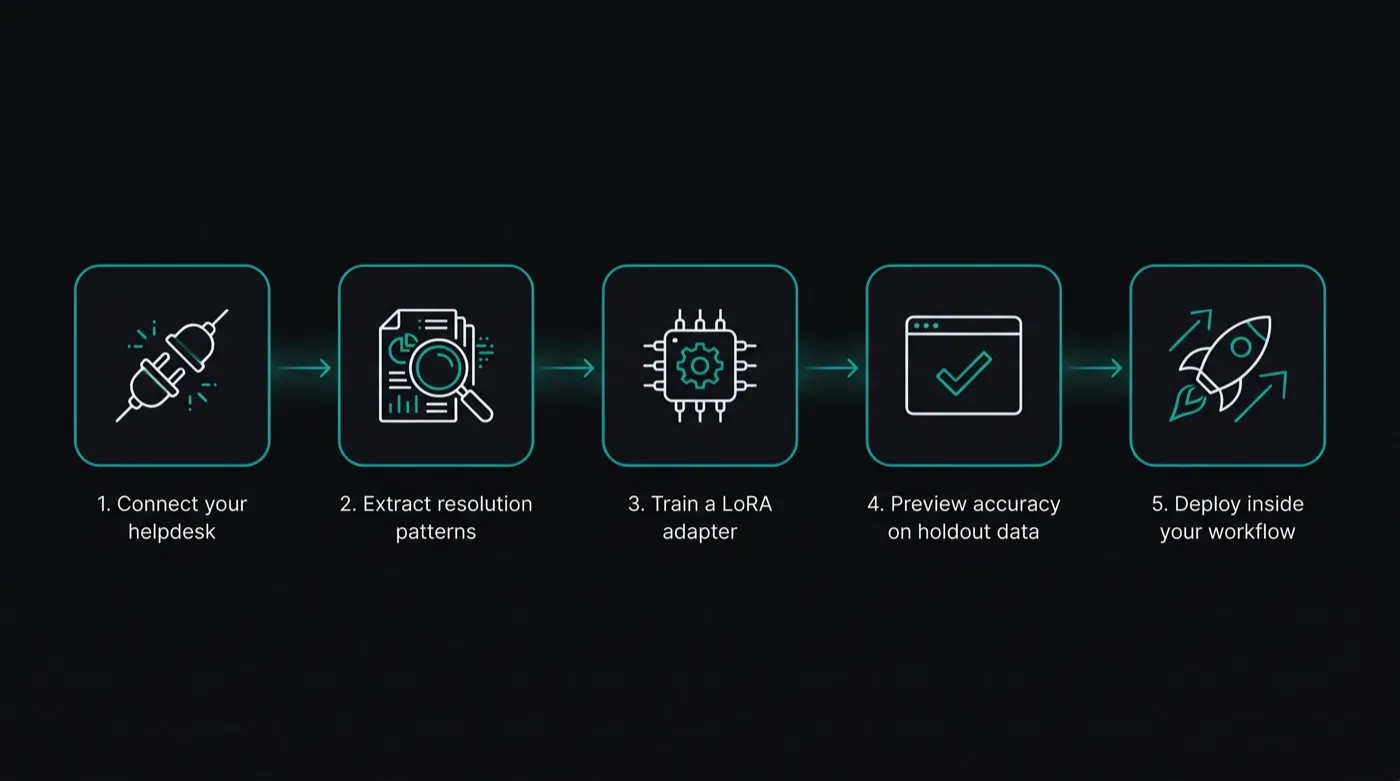
Here's how the process works end-to-end when you're using a platform like CloneDesk:
Connect your helpdesk
Connect your Zendesk or Intercom account. CloneDesk ingests your resolved ticket history — typically the past 6–18 months of interactions. No migration, no rip-and-replace. The connection takes under 10 minutes.
Extract resolution patterns
CloneDesk processes your historical interactions to extract behavioral patterns: how your best agents phrase responses across different ticket categories, when they escalate, how they handle edge cases, what tone they use with frustrated customers. This is the training signal — the "how," not the "what."
Train a LoRA adapter on your patterns
A LoRA adapter is trained on your extracted patterns. For most teams, this completes in 1–6 hours depending on data volume. The result is a behavioral adapter that encodes your team's resolution style — ready to be merged with the base model for deployment.
Preview accuracy on your holdout data
Before a single live ticket runs through the model, CloneDesk evaluates the trained adapter against a holdout set of your historical interactions and shows projected resolution accuracy. You see the number on your data — not benchmark data, not synthetic data — before going live.
Deploy inside your existing workflow
The behavioral agent goes live inside your existing Zendesk or Intercom workflow. Resolution rate, CSAT, and escalation patterns are tracked in real time. As new tickets are resolved, the model continues learning — the adapter stays current with your team's evolving patterns.
Production deployments using comparable behavioral fine-tuning approaches show what's achievable at scale:
Both cases illustrate the same pattern: a fine-tuned model trained on domain-specific data outperforms a general-purpose model on the narrow task — not by sacrificing capability, but by specializing it.